Close Combat Network
Welcome to Close Combat Series
  Login or Register Home  ·  Downloads  ·  Forums  ·  Combat Camera  ·  Help  

  Survey   
 
The economic crisis, who or what caused it?

GWB
Oil and energy prices
Global warming…
Greedy bankers and CEOs
Its just normal economic cycles
To liberal lending rules…
Other...


Results
Polls

Votes 612
Comments: 9

  Shout Box!!   
 

Only registered users can shout. Please login or create an account.


  Main Menu   
 
HomeHome  
    Home
Articles  
Community  
    Forums
    Downloads
    Combat Camera
    Donations
    Help
Members  
    Private Messages
    Profile
    Your Account
Statistics  
    Statistics
    Top 10
Other  
    News
    Search News
    News Archive
    Site Map
    Recommend Us
    Disclaimer

  Donations   
 
Headgehoghead - $20.00
07/10/2010


Total: $20.00
Goal: $80.00
Difference: $60.00

Find our site useful? Make a small donation to show your support.


Mod Installation - Stalingrad 1.2

Installation for the beginner


The Stalingrad mod comes in 3 easy to install files. Follow these steps exactly
and you should have an error free install.


STEP 1

Make a full install of Close Combat 5 Invasion Normandy to your harddrive, into the default folder. (C:/Program Files/SSI/Close Combat Invasion Normandy/)


STEP 1 COMPLETE


STEP 2
Download the following file from CCS:

  • CCVPatch501a.exe

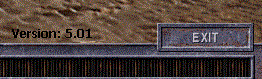
    Run this EXE file and DO NOT change any settings. Just keep pressing next no matter what it says. As long as you installed Close Combat 5 into the default folder, this patch will patch the game without you having to change anything. Once the patch is install open up CC5 and look in the bottom right for the version number. The picture below is what you should see.


    If you do not see 5.01 in the bottom right then you either do not have a full install of CC5 or you changed something while installing the patch.

    STEP 2 COMPLETE


    STEP 3

    Download the following file from CCS:


  • CfgV13.zip - This is Config Manager v1.3. Its used to install plugins into Close Combat 5.


    Unzip CfgV13.zip into "C:/Config Manager/" If the folder does not already exist,
    create it. Refer to the image below to what Config Manager should look like
    on your harddrive after its unzipped.


    STEP 3 COMPLETE

    STEP 4

    Download the following file from CCS:


  • Stalingrad Version 1.2


    This is the plugin file for Stalingrad version 1.2. Unzip this file into "C:/Config Manager/plugins". Refer to the picture below for proper folder and file structure.


    STEP 4 COMPLETE


    STEP 5


    Download the following file from CCS:


  • CC5_Stalingrad_MapPack.zip


    Unzip this files contents into "C:/ProgramFiles/SSI/Close Combat Invasion Normandy/Maps/". This file contains every map needed to run Stalingrad version 1.0. Refer to the picture below for proper folder and file structure.


    STEP 5 COMPLETE


    STEP 6


    Download the following file from CCS:


  • CC5_Stalingrad_v1.2_video.zip


    If you do not already have a videos folder, create one now. Unzip the video
    to "C:/Program Files/SSI/Close Combat Invasion Normandy/Videos/" Refer to the
    picture below.


    STEP 6 COMPLETE


    STEP 7


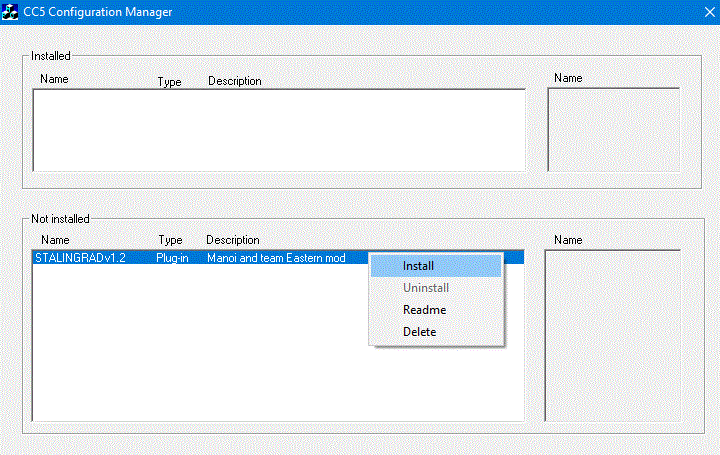
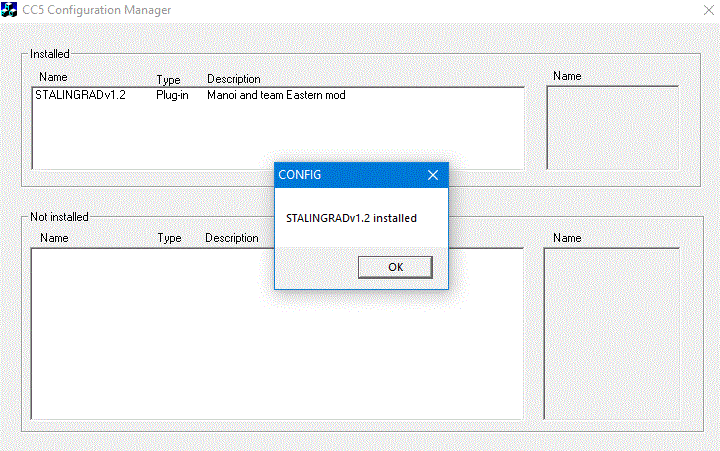
    You are now ready to install the mod using Config Manager 1.3. Run the file
    "C:/Config Manager/CfgV13.exe/". Once open you should see "STALINGRADv1.2" in
    the bottom box labelled not installed. Right click "STALINGRADv1.2" and select
    "install."


    STEP 7 COMPLETE


    As long as you followed every step properly you will be ready to play the CC5
    Stalingrad mod.


    If you have any problems with your install post them here
    in the Stalingrad forum.


    See also

    Installing CC to another harddrive
    Stalingrad Air Strike Guide


    Webmaster

    Copyright © by Close Combat Series All Right Reserved.

    Published on: 2005-10-10 (24539 reads)

    [ Go Back ]
  • Content ©


    In August of 2004, Zappi, Homba, Bambam887, RedScorpion and MOOXE all pitched
    in to create this Close Combat site. I would to thank all the people who have visited and
    found this site to thier liking. I hope you had time to check out some of the great Close Combat
    mods and our forums. I'd also like to thank all the members of our volunteer staff that have
    helped over the years, and all our users that contributed to this site!

    The following services and sites are also provided by us...

    Tournament House | Free Teamspeak Hosting